In the process of scouring Alibaba for a cheap Versal devkit, I unexpectedly came into possession of a Zhihe Computing A210 RISC-V SoC.1
It’s a cool board: there’s a ridiculous amount of IO exposed by the baseboard, not to mention 8 cores clocked at 1.9 GHz is nothing to sniff at for a RISC-V CPU. I’m not sure I could recommend buying any RISC-V SoC currently2, but all these distros that are starting to support RISC-V need to run tests somewhere that isn’t Spike/QEMU.
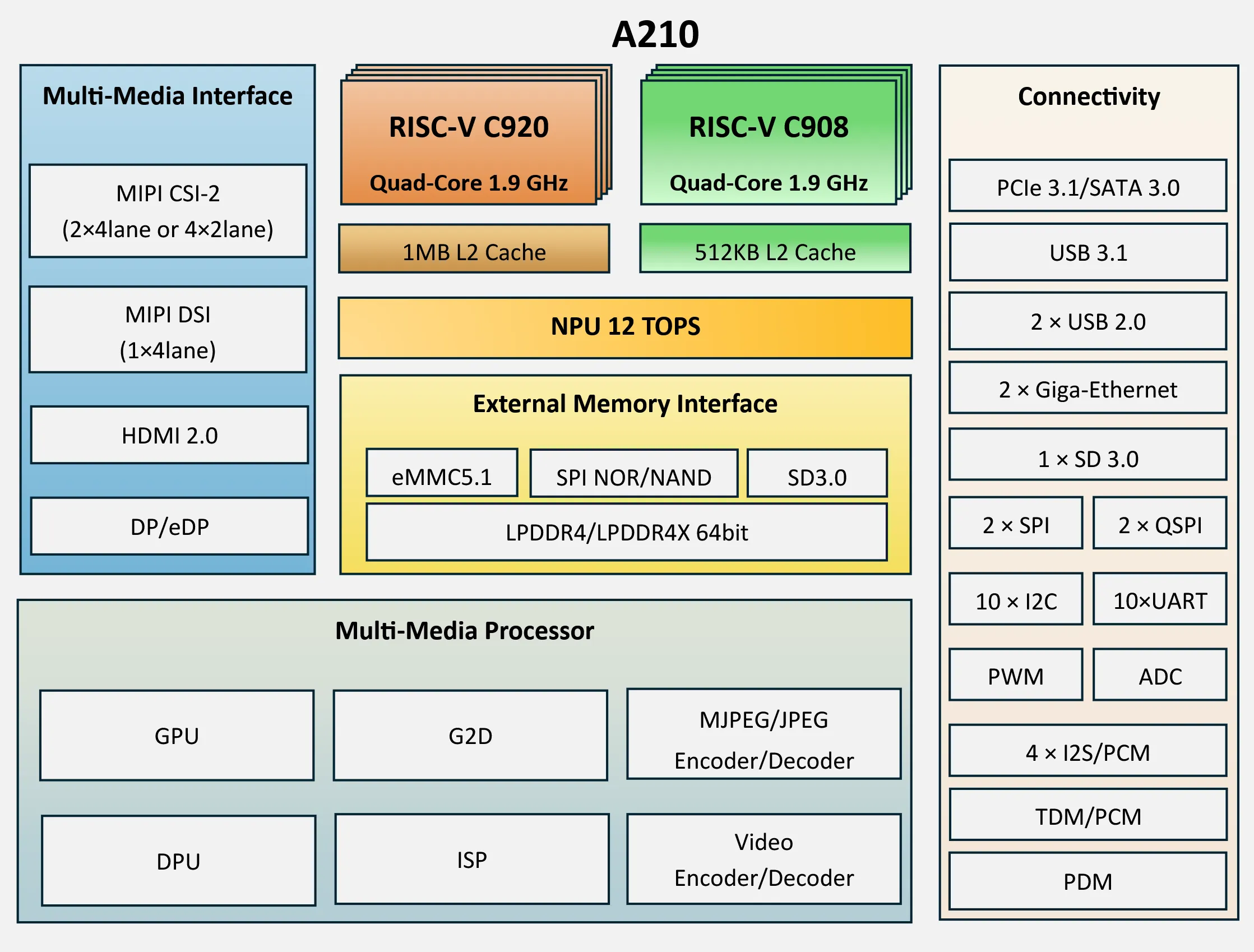
I decided to make this board into a NixOS build server so I could learn more about the state of RISC-V support in NixOS and to get some practice in Linux bringup.
My complete A210 NixOS configuration can be found here; I confirmed sound, HDMI, Bluetooth/Wi-Fi, ethernet, and the GPU were all working, but YMMV.
I use NixOS btw

Nix makes cross compiling to RISC-V a breeze:
Nix
pkgs = import {
  system = "x86_64-linux";
  crossSystem.system = "riscv64-linux";
};
It really is that easy—building pkgs.hello will produce a bona fide RISC-V executable (you don’t even need a Nix file for one-off builds, just run nix build nixpkgs#pkgsCross.riscv64.hello). Some black magic in callPackage ensures that compile-time tools are built for buildPlatform and build artifacts are built for hostPlatform.
In the process of compiling over a thousand packages I only ran into two issues: a problem with rust-bindgen using the wrong version of clang and ministream not being properly configured for cross compilation, neither of which was specific to RISC-V.
That having been said, I did run into some pretty bizarre OOM issues for some of the heavy hitters like Clang and GFortran.
I was seeing >9GB memory usage per linking process(!) when compiling from x86_64-linux, which will quickly exhaust all of your memory if you have max-jobs/cores set to sane values.
I sidestepped this issue by temporarily nerfing build parallelism into oblivion and running the offending builds overnight:
Bash
nix-store --realise /nix/store/...-clang-riscv64-unknown-linux-gnu-21.1.8.drv -j1 --cores 3 --builders ""I don’t (yet) have access to a RISC-V remote Nix builder, but even if I did, it’s substantially faster to cross compile everything from my desktop. Cross compilation can get a little wonky with Nix flakes because you have to encode the buildPlatform in the output schema somehow, but nixosConfigurations does not allow nesting (nixosConfigurations.x86_64-linux-a210 is valid, but nixosConfigurations.x86_64-linux.a210 isn’t).
My solution to this is to expose the relevant build artifacts of the NixOS configuration (ISO + flashing script) under packages.${system} by creating a “wrapper” NixOS configuration for each buildPlatform that extends nixosConfigurations.a210:
Nix
packages = forAllSystems (pkgs: let
  nixosCross = self.nixosConfigurations.a210.extendModules {
    modules = [
      ({ ... }: {
        nixpkgs = {
          inherit pkgs;
          overlays = [
            # ...
          ];
          buildPlatform = { inherit (pkgs.stdenv.buildPlatform) system; };
          hostPlatform = "riscv64-linux";
        };
      })
    ];
  };
in {
  inherit (nixosCross.config.system.build) toplevel image initialRamdisk;
};
This way nixosConfigurations is agnostic to buildPlatform, and cross compilation is straightforward—running nix build .#image on an x86_64-linux machine will use x86_64-linux as the buildPlatform, as one would expect.
Boot flow
Ok, so the goal is to boot U-Boot FSBL -> OpenSBI -> U-Boot SSBL -> Linux -> NixOS userspace, using the vendor’s Buildroot scripts as reference.
Using vendor forks of U-Boot/Linux/OpenSBI is a simple matter of overriding src and sprinkling in a few patches (almost always to fix compiler warnings that have been promoted to errors in the latest version of GCC/Clang in nixpkgs). All we really have to do is slot in the vendor kernel by setting boot.kernelPackages = pkgs.linuxPackagesFor pkgs.linuxA210;
Armed with a bootloader and NixOS image, I plugged in the A210 to my MacBook and turned on Fastboot flashing mode, but to my dismay macOS refused to enumerate the device. Initially I figured the board was a lemon (due to it being a freebie and all), but I wasn’t ready to give up hope that easily.
I pored over the datasheet looking for alternative boot methods, and I investigated using PD resistors to force QSPI boot (using NORbert in lieu of a real QSPI device) to bootstrap into Linux userspace, at which point I could flash the eMMC directly without relying on Fastboot. But before pulling out my soldering iron I decided to try plugging the board into a different computer, which instantly detected the board. D’oh!
Ok, so Fastboot works3 and I’m able to load the flasher firmware and program eMMC (I based my Fastboot payload on openEuler’s A210 guide instead of the vendor’s script which flashes 7(!) different partitions), but after that I still got dead silence on UART.
At this point I was pretty suspicious of my serial connection, so I decided to test it on a Pi Pico: lo and behold, it turns out leaving my BMP’s vRef pin floating was the culprit.
After losing several hours and my dignity to the aforementioned skill issue, I was greeted with the following panic:
sbi_trap_error: hart0: trap1: illegal instruction handler failed (error -2)

sbi_trap_error: hart0: trap1: mcause=0x0000000000000002 mtval=0x00000000cc087057
sbi_trap_error: hart0: trap1: mepc=0x000000008000bb24 mstatus=0x0000000a00001800
sbi_trap_error: hart0: trap1: ra=0x0000000080007336 sp=0x0000000080062e68
sbi_trap_error: hart0: trap1: gp=0x0000000082c50aa0 tp=0x0000000082c54c80
sbi_trap_error: hart0: trap1: s0=0x0000000080062eb8 s1=0x0000000080062eb8
sbi_trap_error: hart0: trap1: a0=0x0000000080062eb8 a1=0x0000000000000000
sbi_trap_error: hart0: trap1: a2=0x0000000000000000 a3=0x0000000000000000
sbi_trap_error: hart0: trap1: a4=0x0000000080027c94 a5=0x0000000080007330
sbi_trap_error: hart0: trap1: a6=0x0000000000000004 a7=0x0000000000000010
sbi_trap_error: hart0: trap1: s2=0x0000000080063000 s3=0x00000000fa685000
sbi_trap_error: hart0: trap1: s4=0x0000000080200000 s5=0x0000000000000000
sbi_trap_error: hart0: trap1: s6=0x00000000fff3661e s7=0x0000000000000000
sbi_trap_error: hart0: trap1: s8=0x00000000fbf37c50 s9=0x0000000000000001
sbi_trap_error: hart0: trap1: s10=0x00000000fbf44b90 s11=0x00000000fbf2d228
sbi_trap_error: hart0: trap1: t0=0x0000040000000000 t1=0x000000008156c15d
sbi_trap_error: hart0: trap1: t2=0x0000000002000000 t3=0x000000008156c158
sbi_trap_error: hart0: trap1: t4=0x0000000000000007 t5=0x00000000fa688fff
sbi_trap_error: hart0: trap1: t6=0x00000000fbf2c428
Are we RISC-V yet?
Judging from the above register dump, something seems to be amiss with OpenSBI itself:
Bash
echo '577008cc' | llvm-mc --triple=riscv64 --mattr=+v --hex --disassemblevsetivli zero, 16, e8, m1, ta, maThis confirmed my suspicion that the illegal instruction was from an ISA extension (in this case, a vector instruction). Initially I didn’t understand why this occurred: why would a CPU trap on an instruction it supports? I consulted the ISA spec and discovered that executing a vector instruction without the vector context bits of the mstatus register configured properly will result in the exact illegal instruction exception that I was seeing.
So roughly what was happening was the processor was context switching to OpenSBI where the vector context was not enabled, but certain operations like memset were optimized to use vector extensions because OpenSBI was compiled with -march=rv64gv. I conjecture that the vendor didn’t run into this issue because they compiled OpenSBI with a GCC toolchain that didn’t support vector instructions, but who’s to say? Backporting a patch that sets -march=generic did the trick, and now we’re making it into U-Boot stage 2.
At this point I could boot Linux from eMMC manually, but I wanted to take the time to do things “right”. I prefer the more generic distro boot to the hard coded boot command the vendor came up with, so I decided to roll my own board header.
C
include/configs/a210-evb.h
#ifndef __CONFIG_A210_EVB_H
#define __CONFIG_A210_EVB_H

#ifndef CONFIG_SPL_BUILD
#define BOOT_TARGET_DEVICES(func) \
  func(MMC, mmc, 0)
#include <config_distro_bootcmd.h>
#else
#define BOOTENV
#endif

#define CFG_EXTRA_ENV_SETTINGS \
  BOOTENV \
  "boot_loglevel=1\0" \
  "kernel_addr_r=0x82000000\0" \
  "kernel_comp_addr_r=0x8a000000\0" \
  "kernel_comp_size=0x6000000\0" \
  "fdt_addr=0x8c000000\0" \
  "fdt_addr_r=0x9ff00000\0" \
  "ramdisk_addr_r=0x90000000\0" \
  "scriptaddr=0x88000000\0" \
  "pxefile_addr_r=0x88100000\0" \
  "\0"

#endif
Ok—now we’re able to get most of the way through the initrd before UART abruptly goes silent. Fortunately, the last message makes the problem pretty clear:
[ 7.010500] clk: Disabling unused clocksIt’s a bit of a hack, but I decided to set clk_ignore_unused on the kernel command line just to see if we could get more logs. Imagine my surprise when after reflashing, the board makes it all the way into NixOS userspace with no issues! Although I steeled my resolve to go spelunking in the device tree to find which clock was not marked as critical, I decided not to waste my time when I realized the vendor also sets clk_ignore_unused in their kernel cmdline. ¯\_(ツ)_/¯
Regarding security
I would be remiss if I didn’t mention that running an old kernel in the current era of AI-assisted kernel vulnerability disclosures hitting LKML every other week does not exactly help me sleep better at night. I looked into backporting patches for Dirty Frag and co., but if the attacker has access to my tailnet I’m already cooked.
GPU’nt working
So now that I can SSH in, we’re done, right? Well, the vendor explicitly advertises support for Vulkan/OpenGL ES, so I decided I couldn’t call this finished until I brought up the GPU.
This requires support in both the kernel (a driver to talk to the actual GPU hardware) and in userspace (implementing a uniform interface like Vulkan over the device-specific API). For the former, The vendor opts to ship a kernel module with no source; a firmware blob (with a device tree to make sense of it) I can generally understand, but I don’t get shipping kernel modules, and here’s why:
Kernel modules rely on the pertinent ABIs of the kernel being built against and the kernel the module will run on being nearly identical.
If CONFIG_MODVERSIONS is set in your Kconfig (which it should be), the kernel will refuse to load a module if its vermagic (basically an ABI checksum) doesn’t match that of the running kernel.
I’m using the vendor’s fork of Linux, so the vermagic matches exactly—so far so good.
But comparing vermagics only checks for identical function prototypes; there are several Kconfig options that can change the size, alignment and layout of kernel data structures like struct module. Many of these are security or debugging related, and I’ve done enough kernel exploitation in my day to understand that there are good reasons to introduce this seemingly unnecessary binary incompatibility.
The upshot is I can’t use the vendor kernel module unless I massage NixOS’s Kconfig into producing a kernel that passes Linux’s ABI compatibility smell checks.
While searching for an alternative solution, I was pleasantly surprised to learn that my GPU is already supported in upstream Linux and Mesa! In my naïvety I thought “great, we’ll clone Linux 6.18, run make -M=$PWD/drivers/gpu/drm/imagination -C vendor-linux/lib/modules/6.6.0/build modules and we’ll have a perfectly compatible driver!”
However, several changes in the DRM subsystem thwarted my attempt for a clean port, and in a fit of desperation (SLOP WARNING) I vibe ported the driver from the 6.18 kernel tree to an external module I could compile against the vendor fork of Linux 6.6. Adding a ton of code I did not write or understand is especially not good for software running with supervisor-level permissions; using this code feels like taping a “pwn me” sign to my back.
If you’re following along, I want to emphasize that my slop driver is only for using the A210’s GPU, and if you chose to use it you should first sic your own clanker on the source to make sure I’m not punking you.4 Alas, this is (in my opinion) still better than trying to use the prebuilt kernel module.
Robot wrangling tip
I was getting a bit fed up with the “compile-nix copy-kernel hang” loop, so I took a few minutes to setup a MCP server for Ghidra. I then tasked Codex (without Daybreak) with comparing the vendor-supplied kernel module with the slop that was ported from newer Linux.
The issue was identified and fixed within 3 minutes, whereas printk debugging and debugfs abuse got nowhere in several hours.
Static analysis for the win!
After ironing out the kinks in the kernel side, we need to coax Mesa into letting us use it by setting PVR_I_WANT_A_BROKEN_VULKAN_DRIVER, after which we can successfully draw triangles!
=======================================================
    vkmark 2025.01
=======================================================
    Vendor ID:      0x1010
    Device ID:      0x36104182
    Device Name:    PowerVR B-Series BXM-4-64 MC1
    Driver Version: 109060102
    Device UUID:    4f8b656c3f16826f4c0fb79ad2d8c9a9
=======================================================
[clear] duration=20: FPS: 627 FrameTime: 1.595 ms
[cube] duration=20: FPS: 333 FrameTime: 3.003 ms
[shading] duration=20: FPS: 179 FrameTime: 5.587 ms
[desktop] duration=20: FPS: 68 FrameTime: 14.706 ms
[effect2d] duration=20: FPS: 30 FrameTime: 33.333 ms
[texture] duration=20: FPS: 222 FrameTime: 4.505 ms
[vertex] duration=20: FPS: 253 FrameTime: 3.953 ms
=======================================================
                                   vkmark Score: 2445
=======================================================HDMI capture of glmark2-es2-wayland running under Zink (context for texture)
Lessons learned
-
macOS USB support kinda sucks (I’ve encountered similar issues with the Altera USB-Blaster III); if a device isn’t detected, try a different computer.
(In an attempt to update my USB drivers I made the generational fumble of updating to macOS 27, which makes Asahi Linux look stable in comparison.)
-
Never assume something works just because you think it should (trust, but verify).
-
The multitude of kernel configuration options makes kernel module API/ABI compatibility a pain; having source makes the problem tenable but still nontrivial.
Overall, this was a fun (if not unexpected) project. I have fond memories of designing a OoO RISC-V CPU with all the bells and whistles during my time at uni, so this nerd snipe was particularly gratifying for me.
It’s a bit of a shame that this machine won’t see a lot of use, but I anticipate that will change as RISC-V adoption continues to grow. Also, I am still flabbergasted that NixOS is completely slept on by SoC suppliers; I eagerly await the day NixOS will eat Yocto/PetaLinux/Buildroot’s lunch.
-
I paid a frankly too-good-to-be-true price of $1.2k for an Alinx VD100, and so I was disappointed but not surprised when I instead received some random $300 RISC-V curio. Thankfully I was able to get a full refund and keep the board; I think the “scam” here is to write off the cost of excess inventory as misshipments instead of surplus. ↩︎
-
I’m loathe to recommend a Microchip product, but the PolarFire SoC Discovery costs $130 and doubles as both a RV64GC SoC and an FPGA. ↩︎
-
I couldn’t get the board to enter Fastboot mode after I flashed a bootloader, but this was fine because I could run fastboot usb 0 in U-Boot instead. ↩︎
-
This is not to say you shouldn’t audit the other stuff too, but if you were pwned by something other than the PowerVR driver, at least you could take solace in the fact that a human (me) had the last laugh. ↩︎
-
To call this GPU “dinky” would be an understatement; for comparison, my RX 6700 XT scores 26230 on the same benchmark. ↩︎